
Microsoft Fabric Migration Services: Modernise Legacy Analytics Without Disrupting Operations>
Finance is reviewing revenue. Operations is monitoring performance. Customer teams are tracking service issues. Leadership needs accurate information before the next meeting begins.
Behind those dashboards, however, there may be an ageing analytics environment built from legacy data warehouses, disconnected databases, spreadsheets, Power BI reports and pipelines that only a handful of employees fully understand.
Leadership knows the environment needs to change. But one concern often delays modernisation:
Share on socials
Follow us on our socials:
How do we move to Microsoft Fabric without disrupting the reports and data the business depends on every day?
That is the real challenge of Microsoft Fabric migration.
Successful migration is not simply about transferring data to a newer platform. It is about moving from fragmented analytics towards a governed, scalable and AI-ready data environment while protecting business continuity throughout the transition.
For organisations considering legacy analytics modernisation, Azure Synapse migration or Power BI migration, the practical strategy is to understand understand what matters, modernise selectively and migrate in controlled stages.
Why Legacy Analytics Is Becoming a Business Risk
Legacy analytics environments rarely become complicated intentionally.
Finance introduces a database. Operations develops separate reporting pipelines. Customer teams create dashboards. Power BI expands across departments. Older systems remain because important historical reports still depend on them.
Over time, the organisation may have plenty of data but limited confidence in it.
Common warning signs include:
- Different departments reporting different figures for the same KPI.
- Critical reports depending on manual processes.
- Slow delivery of new reports and analysis.
- Duplicate datasets and dashboards.
- Limited visibility into data ownership and lineage.
- Legacy platforms becoming expensive or difficult to maintain.
- AI initiatives struggling because underlying data is fragmented.
These issues can affect reporting accuracy, business decisions and operating costs.
Research from the IBM Institute for Business Value found that only 26% of surveyed senior data and analytics leaders were confident their organisation’s data could support new AI-enabled revenue streams. Data accessibility, accuracy, completeness and consistency remained important concerns.
The implication is straightforward:

AI readiness starts with data readiness.
Microsoft Fabric creates an opportunity to address this challenge by bringing data integration, engineering, warehousing, analytics, data science and Power BI into a unified environment built around OneLake.
But organisations should resist the temptation to recreate every legacy process inside Fabric.

Do Not Migrate Everything
One of the risks in a Microsoft Fabric migration is assuming that every existing database, pipeline and report deserves to move.
A typical enterprise analytics estate may include SQL Server, Azure Synapse Analytics, Azure Data Factory, Power BI, Excel reporting, departmental databases, data lakes and custom integrations.
Each workload should be assessed against its future business value.

Modernise
Redesign workloads where existing architecture, data models or processes would limit performance, scalability or governance.

Retain
Keep specialised or highly dependent workloads in their current environment temporarily while a safer migration path is developed.

Retire
Remove reports, datasets and pipelines that are duplicated, unused or no longer support meaningful business decisions.
The better question is not: “How do we migrate everything?”
It is: “What should our future analytics environment look like?
Before moving data, identify the reports and analytical processes the organisation cannot afford to interrupt.
These may include:
- Executive dashboards.
- Financial and revenue reporting.
- Regulatory reports.
- Customer-service analytics
- Operational performance reporting.
- Risk and compliance dashboards.
For each critical output, understand its business owner, source data, dependencies, refresh frequency, security requirements and acceptable downtime.
This exercise often exposes hidden complexity.
A dashboard that appears simple may depend on several databases, spreadsheets, transformation scripts and manual processes. Migrating the visible report without understanding those dependencies can disrupt operations even when the technical migration succeeds.
Business continuity should guide migration sequencing along side not technical requirements.
Design the Fabric Foundation Before Moving Data
Once the existing analytics estate is understood, organisations can design the target Microsoft Fabric environment.
Different workloads may require different Fabric capabilities.
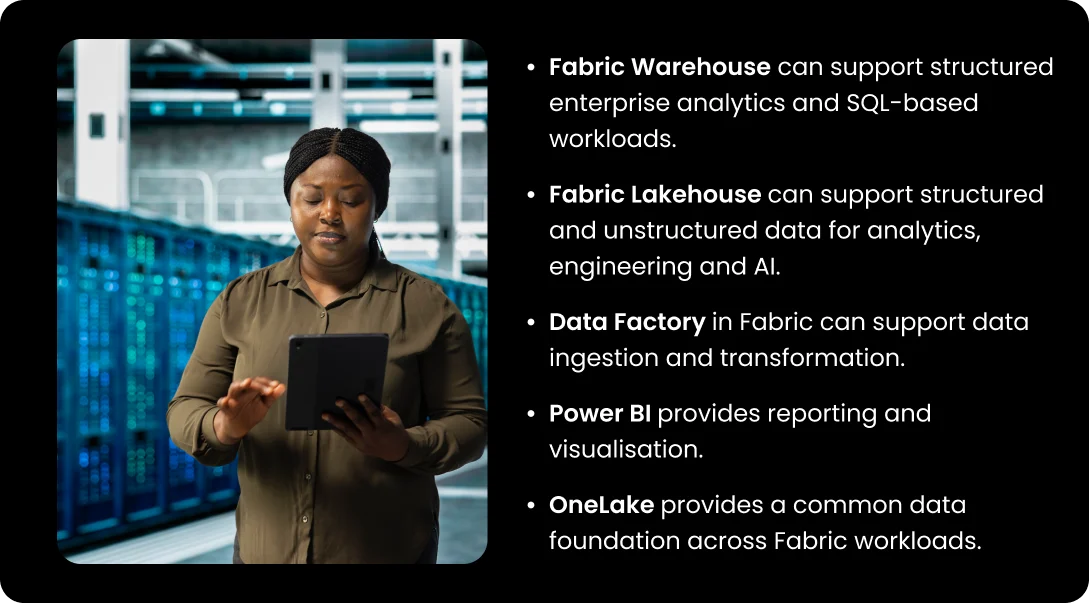
OneLake provides a common data foundation across Fabric workloads.
The opportunity is not simply to centralise information. It is to reduce unnecessary duplication while creating clearer ownership, governance and access controls.
Before migration begins, organisations should define:
- Workspace structure.
- Development, testing and production environments.
- Data ownership.
- Security responsibilities.
- Data retention requirements.
- Integration with existing systems.
- Capacity requirements.
- Monitoring and support responsibilities.
This creates a foundation that can support the organisation beyond the initial migration.
Design the Fabric Foundation Before Moving Data
Moving fragmented data into a modern platform without improving governance simply creates a newer version of the same problem.
Security and governance should therefore be established before sensitive workloads are migrated.
Leadership and data teams should be able to answer:
- Who owns each important dataset?
- Who should have access to sensitive information?
- Who can publish or modify reports?
- Who administers the Fabric environment?
- How will privileged access be controlled?
- How will data lineage and usage be monitored?
Microsoft Fabric works with Microsoft Entra ID for identity and access management and can integrate with Microsoft Purview capabilities for data governance and protection.
Migration therefore provides an opportunity to review access rather than automatically copying legacy permissions.
A user who required access several years ago may no longer need it. A department maintaining its own copy of customer data may instead be able to use a governed shared data product.
A modern data platform needs a modern governance model.
Pilot One Business Area Before Scaling
A Microsoft Fabric migration should not begin with the organisation’s most complicated analytics environment.
Start with a manageable business domain that is important enough to demonstrate value and limited enough in scope to manage risk.
This could be customer analytics, operational reporting or a defined finance process.
The pilot should test the complete analytics journey:
Source data → ingestion → transformation → storage → reporting → business use
Security and governance should be checked throughout. This is more valuable than migrating an isolated dataset because it demonstrates whether Fabric can support an actual business process.
The pilot can also reveal:
- Data-quality problems.
- Performance requirements.
- Security gaps.
- Capacity needs.
- Skills requirements.
- Reporting dependencies.
- User-adoption challenges.
These lessons can then improve subsequent migration waves.
Run Legacy and Fabric Analytics Side by Side
For business-critical analytics, organisations should avoid switching immediately from the legacy environment to Microsoft Fabric after the first successful migration.
Instead, both environments can operate in parallel for an agreed validation period.
Teams should compare:
- Data totals and calculations.
- Historical trends.
- Report refreshes.
- Query performance.
- User permissions.
- Exceptions and failed processes.
If the legacy report shows one revenue figure and Fabric shows another, the difference must be understood before cutover.
Migration can expose undocumented calculations, inconsistent definitions or data-quality problems that have existed for years.
This makes parallel validation valuable.
The objective is not simply to prove that Fabric works. It is to prove that the business can trust what Fabric produces.
Migrate in Controlled Waves
Once the pilot has been validated, migration can expand gradually.
Workloads should be grouped according to business processes and technical dependencies rather than moved randomly.
Each migration wave should have clear criteria covering:
- Data reconciliation.
- Report and query performance.
- Security validation.
- Business-user acceptance.
- Support readiness.
- Cutover timing.
- Rollback arrangements.
Critical reporting should move only when technology teams and business owners are confident in the new environment.
The legacy platform should also remain available until important dependencies have been removed and retention requirements addressed.
This approach reduces the risk of a technically successful migration becoming an operational problem.
Protect the Power BI User Experience
Most business users do not need to interact directly with OneLake, pipelines or Fabric Warehouses.
They experience analytics through the reports they use.
That makes Power BI migration and user adoption critical parts of the programme. Power BI is already part of Microsoft Fabric.
Where existing Power BI reports remain valuable, organisations can preserve familiar reporting experiences while progressively modernising the underlying data architecture.
Where reports need redesigning, migration provides an opportunity to remove duplicate dashboards, obsolete metrics, unnecessary visuals and manual calculations.
Business users should be involved early. They need to understand what is changing, why it matters and whether important definitions or calculations will be affected.
Training and support should continue after launch.
A technically advanced analytics platform creates limited value if employees continue exporting information into spreadsheets because they do not trust or understand the new environment.
Manage Fabric Capacity Around Business Demand
Microsoft Fabric uses a capacity-based model across analytics workloads. This means organisations need visibility into how reporting, pipelines, data engineering and other activities consume capacity.
Migration planning should therefore include realistic testing using representative data volumes and reporting patterns.
Leaders should monitor:
- Capacity utilisation.
- Report performance.
- Pipeline consumption.
- Storage growth.
- Workload peaks.
- Development and testing usage.
Month-end reporting, for example, may create very different demand from normal daily operations.
The objective is to ensure the organization has sufficient resources to deliver reliable analytics without paying for capacity that produces little business value.
Measure Business Outcomes, Not Migration Volume
A Microsoft Fabric migration should not be declared successful simply because a certain number of databases, pipelines or reports have moved.
Executives should measure outcomes across five areas.
Business Continuity
Did critical reporting remain available throughout the transition?
Data Trust
Do users have greater confidence in data quality, ownership and consistency?
Simplification
Were duplicate reports, unnecessary pipelines and redundant datasets reduced?

Performance and Cost
Are analytics workloads performing reliably, and is capacity being managed effectively?

AI Readiness
Can governed enterprise data now support advanced analytics, automation and approved AI initiatives?Were duplicate reports, unnecessary pipelines and redundant datasets reduced?
Why Reliance Infosystems
Microsoft Fabric migration requires more than moving data.
It requires understanding business priorities, designing the right architecture, protecting critical reporting, establishing governance and helping users adopt the new environment.
Reliance Infosystems brings experience across Microsoft Fabric, Power BI, Azure, data engineering, analytics and AI.
For 9mobile in Nigeria, Reliance Infosystems implemented a Microsoft Fabric solution incorporating OneLake, lakehouse architecture, analytics and Power BI to support predictive analysis and operational reporting.
This experience supports a broader approach to Microsoft Fabric migration services that connects assessment, architecture, migration, analytics, governance and ongoing optimisation.
For organisations considering Azure Synapse migration, Power BI migration or wider legacy analytics modernisation, the goal should not simply be to reach Microsoft Fabric.
It should be to create a data environment that is easier to govern, easier to trust and better prepared for AI-driven decision-making.
Conclusion
A major risk in Microsoft Fabric migration is moving without understanding what the business depends on.
Successful migration begins by identifying critical reporting, assessing the existing analytics estate and deciding what should be migrated, modernised, retained or retired.
Organisations can then establish the Fabric architecture and governance foundation, pilot a representative business area, validate legacy and Fabric outputs side by side and migrate remaining workloads in controlled waves.
With careful planning and validation, Microsoft Fabric migration can become more than a technology upgrade.
It can creates a path from fragmented legacy analytics towards trusted enterprise data, simpler analytics operations and an AI-ready foundation whileprotecting day-to-day reporting.
Is your legacy analytics environment ready for Microsoft Fabric?
Speak with Reliance Infosystems to assess your data estate, identify migration priorities and develop a controlled Microsoft Fabric modernisation roadmap covering OneLake, data engineering, Power BI, governance, security and ongoing optimisation.